Factory Outlets 1550nm Optical Amplifier - DVI 1X8 – GreenGo
Short Description:
Factory Outlets 1550nm Optical Amplifier - DVI 1X8 – GreenGo Detail:
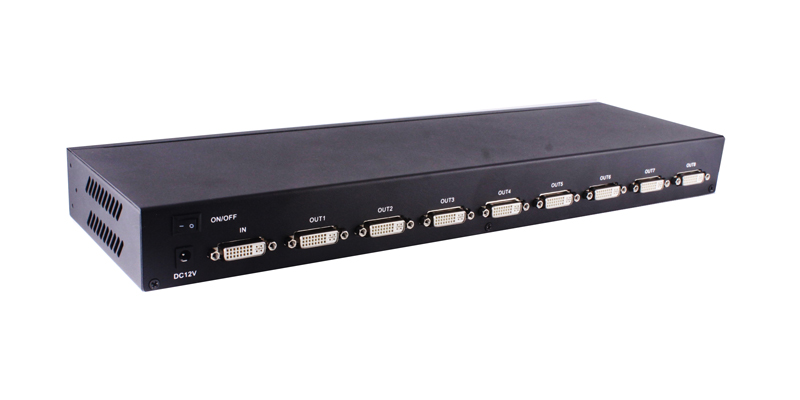
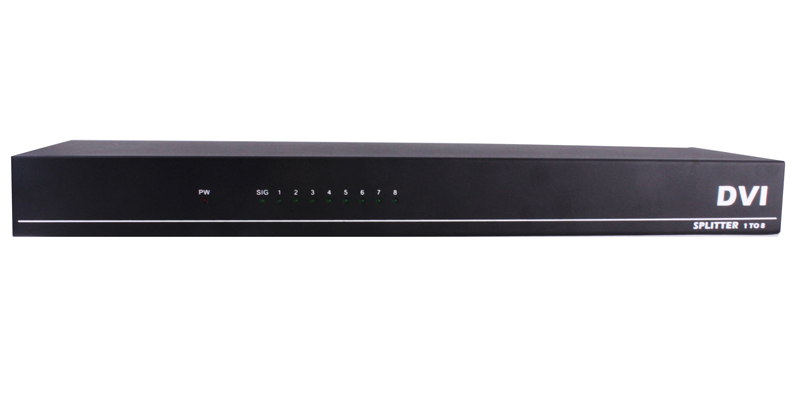
l 1x DVI input and 8xDVI output
l Support resolution:up to 4096×2160@30Hz
l Support for long distance signal transmission
l Installs in minutes, No loss of quality
l Supports wide range voltage DC input (DC12V)
PACKAGE CONTENTS:
2. AC power adapter 1pcs
3. User manual 1pcs

FIG.1.0 Rear Panel View
OUT 1-8: DVI-D output port
ON/OFF: Power Switch
NOTE : EDID MODE: After the splitter is powered on, and then there is a display machine connected to the OUT1, the splitter will get the EDID of display machine connected OUT 1. If there is no any display machine connected to output1, the machine will use default EDID output.

FIG.1.0 Front Panel View
Power: Power LED
Signal: Signal LED
1 – 8: OUT LED
OPERATIONG AND CONNECTION:
- Connect one single link DVI-D cable from a DVI signal source into the input port of splitter.
- Connect single link DVI-D cables from TV/Monitor into the DVI output ports of splitter.
- If the resolution is higher than 1920X1080@60Hz, you must use a DVI-D cables, the signal source and the display must be able to support this resolution.
- Connect DC plug of AC adapter to DC jack and inserted into the power socket.
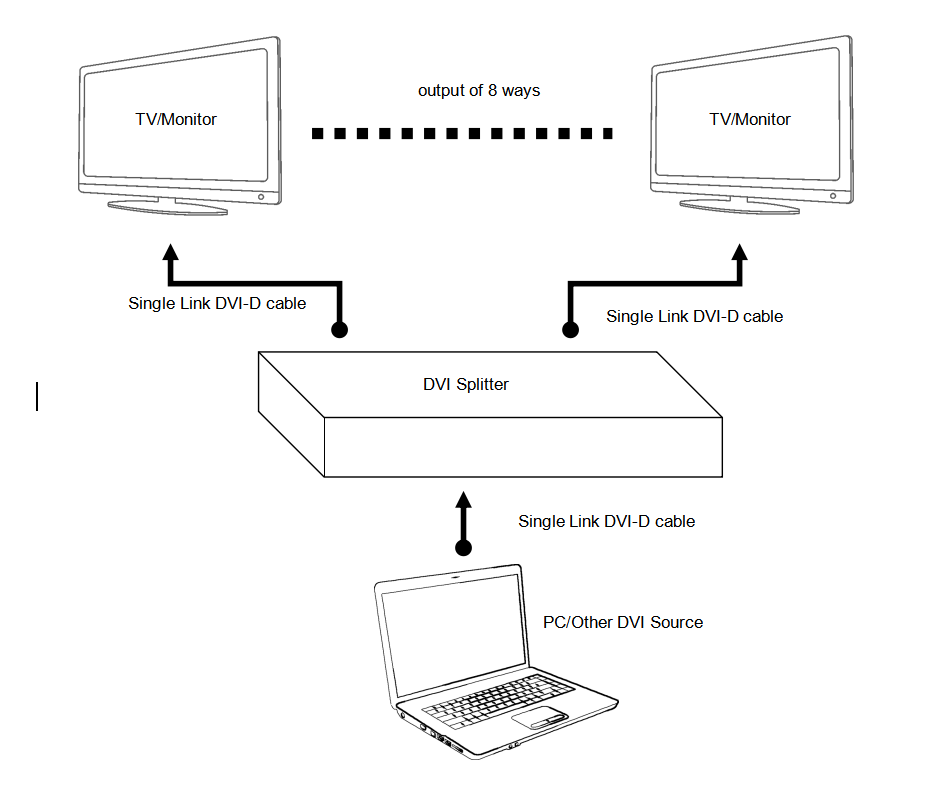
FIG.1.1 CONNECTION DIAGRAM
SPECIFICATIONS:
DVI interface type ………………………………………………………………….DVI-D 29-pin, female
Single link input/output resolution …………………………………………up to 4096×2160@30Hz
Max signal bandwidth………………….………………………………………………..340MHz
Max baud rate…………………….………………………….………………3.4Gbps Serial Link
Input/Output TMDS signal ………….……………………….…..……….0.5~1.5Volts p-p(TTL)
Input/Output DDC signal …………………………..……….…………………. 5Volts p-p (TTL)
Max working current ……………………………….………………………… …………1A/12V
Power adapter ………………………………………AC 100V~240V 50HZ/60Hz, DC12V/2A
Operating Temperature range …………..……………………………………………. -5 to +45℃
Storage Temperature range…………………………………………………………. -15 to +55℃
Operating Humidity range ………………….……….…..…….10 to 90%RH (No Condensation)
Storage Humidity range………………………….………………5 to 95%RH (No Condensation)
Notes:
Pls use the machine as the instruction listed to keep the long use lifetime of the machine.
- The machine should be placed at the spot far from the Damp, High-Temperature, Dusty, Erosive, and oxidative environment.
- All parts will be free from the strong shake, hit, fall.
- Touching the power adaptor with the wet hands is prohibited.
- Pls hold the power adaptor head and do not pull the power cord when cut off from the socket.
- Pls turn the power off when the machines not used for long time.
- Pls do not open the cover and do not touch the inside parts.
- Pls use the original factory power adaptor.
FAQ:
Before power on, pls check the connection line carefully. And make sure that all interfaces are normally connected. The common trouble shooting way shows below:
|
No. |
Problem Description |
Solutions |
|
1 |
Non-Power-Connected |
1. Check if the power adaptor head is truly and correctly inserted the power socket. 2. Check the power if it is in on status. |
|
2 |
No Picture / Abnormal Picture |
1. Confirm the device has been turned on and properly connected. 2. Check the signal source output resolution is appropriate. 3. Device EDID read error, please reboot. 4. Check the cable quality. |
|
3 |
Display format is not supported |
|
Product detail pictures:
Related Product Guide:
CES: STMicro To Demo DOCSIS 3.1, RDK-B | Hd Encoder Modulator
Production Sound Mixer Adam P. Lawrence Improves His Workflow with Wisycom | Hd Encoder Modulator
Our company promises all buyers of the first-class products and solutions as well as most satisfying post-sale support. We warmly welcome our regular and new shoppers to join us for Factory Outlets 1550nm Optical Amplifier - DVI 1X8 – GreenGo, The product will supply to all over the world, such as: St. Petersburg, Portugal, Puerto Rico, High output volume, top quality, timely delivery and your satisfaction are guaranteed. We welcome all inquiries and comments. If you are interested in any of our products or have an OEM order to fulfill, please feel free to contact us now. Working with us will save you money and time.
 By Cherry from Serbia - 2016.03.08 14:45
This company has a lot of ready-made options to choose and also could custom new program according to our demand, which is very nice to meet our needs.
By Julie from Miami - 2015.10.09 19:07